Google AdSense is one of the most innovative way to make money online by displaying ads on your web pages like :- blog, website , forum, articles. Google AdSense was launched on June 18, 2003 and today there are millions of Google AdSense publishers.Google has two tools Google AdSense and Google Adwords from these two tools Google generates most of revenue . Google easily approves AdSense accounts in most of countries but in few countries Google hardly approve AdSense applications.The reason may be one or other . If you are having a website, then Then its good but if you don't have one , no problem you can still create a adsense account for free .
Actually there is no trick behind creating an Adsense account. Many people make fool by creating AdSense account via other websites and then try to sell these accounts which is wrong . Other websites mean those websites who have revenue sharing system Like Blogger, flixya, IndyaRocks, Hubpages. Following are 5websites which allows you to create an AdSense account. You don't have to pay them for this, just create an account at any of following sites and you can apply for your AdSense account from there.
5 Free sites other than blogger to get Google adsense account:-
1. Flixya.com
Flixya is a great way to create an AdSense account for free.
Flixya is a website to share pictures, videos and blogs and it is powered by Google AdSense itself so there are higher chances of AdSense account approval. Simply signup for an account at Flixya, upload 10 ore more pictures, create a blog and apply for an AdSense account. Link: http://www.flixya.com
2. Hubpages.com
Hubpages is a website where people post their articles and get paid out of it.
Hubpages is a revenue sharing website where you can share your article on any subject and they will pay you for this. You can apply for an AdSense account via their Revenue share system. Link: http://www.hubpages.com
3. Docstoc
Its really simple and easy to create an AdSense via Docstoc.
Go to Docstoc, upload few documents there such as txt, doc or presentation files. But make sure those files contain some well written form. Simply go to Docstoc, create an account, upload few docs and apply for an AdSense account. Link: http://www.docstoc.com/
4. IndyaRocks
This is a social network almost like Facebook. Here you can make friends, update your status, share pictures etc.
First of all, create an account there and complete your profile. Write 5 blogs at least and when you have done with it simply apply for an Adsense account application. Link: http://www.indyarocks.com/
5. Webanswers
Webanswers.com is a Q ,A site just like Yahoo! Answers where you can ask questions or answer others question on various topics.
You can get an AdSense account from WebAnswers.com. Simply go to website, post answers to some questions and apply for adsense Link: http://www.webanswers.com/
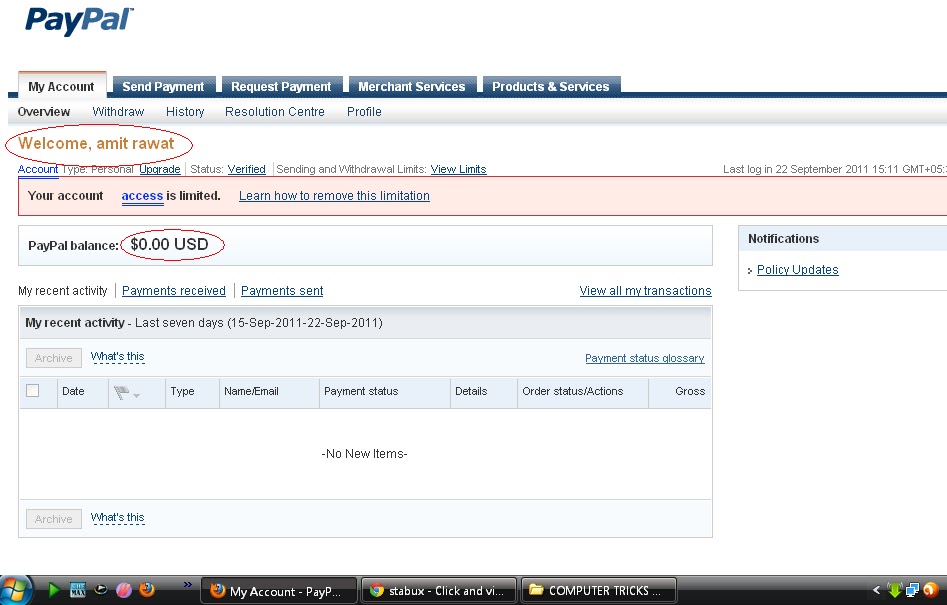
Usually PayPal will limit your account if you have had problems with past transactions, it does this as a precaution against scammers. It usually does this twice to test you and make sure you aren't scamming. . Paypal put limitations on users account just to make sure that they are not scammer or fraud. They will limit users account just to make sure you are only doing legal business. Now how to get rid of paypal limitations:-
Resolution center:-
This is the first place where u can see how to get rid of paypal limitations if these steps works for u then great. you are lucky else follow these steps.
contact by email:-
you can contact paypal by mail, but it will take more then 1-2 weeks to get rid of limitations. so if you can wait for that long give it a try,, otherwise call them or go to there twitter support for instant help
call directly for instant help
Recommended if Resolution center not works
1-402-938-3740 (9:00 a.m. IST to 5:30 p.m. IST, Monday to Sunday)
or call this number---18882155506.. from 4 PM to 10.30 AM(Approx time)
Follow them and then make a tweet they will respond within 5-10mins if you tweet accourding to time(you can tweet any time but they will respond to your tweets at the time mentioned above)
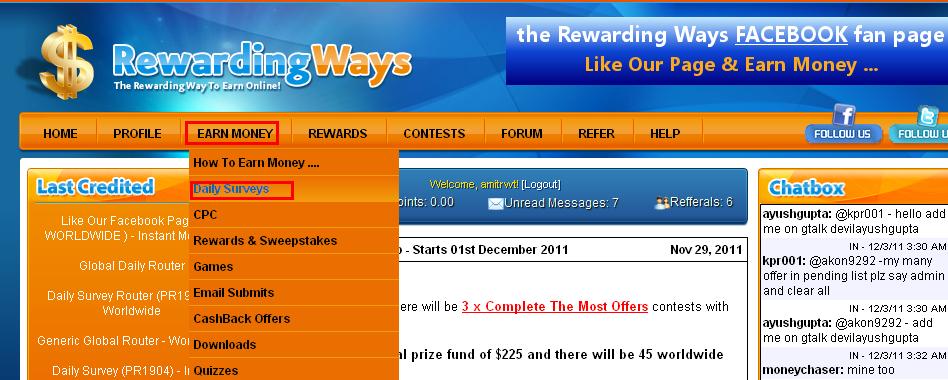
This tricks last examined on 3rd,dec,11. This is a simple trick to get 1$ from a Rewading ways . This is a site which pays u for taking surveys doing tasks etc.. but leave that we are not going to take any survey or any thing..! it only gonna take less then 10 min to earn 1$(INDIA) 0.50$(OUTSIDE) from Rewading ways NOW SIMPLE STEPS HOW THIS TRICK WORKS
Now click on EARN MONEY from top bar and click on DAILY SURVEY from popup menu.
This window will open
Now search for the following offers
Offer Name . Daily Survey Router (PR1980) - Worldwide
Click on the offer banner (DON'T CLICK ON SUBMIT ,IGNORE OR REPORT JUST SIMPLY CLICK ON OFFER BANNER)
a new window will open.
then copy and paste this link http://www.luckypacific.com/redirects/generic_success.html in the address bar of new window and press enter.
after this u will see that offer is done completed or somthing like this
Now click on rewarding ways window
and click on SUBMIT below the offer banner
Refresh your page after some seconds u can see that your offer is done and your account is credited.
Offer Name. Daily Survey (PR1904) - India
Click on the offer Banner (DON'T CLICK ON SUBMIT ,IGNORE OR REPORT JUST SIMPLY CLICK ON OFFER BANNER)
A new window will open .
Now in the address bar of new window Search for this [pgtid=19&ptid] in the link and change the number 19 to 23( pgtid=23&ptid ) and simply press enter .
after this u will see that offer is done completed or somthing like this
Now comeback to rewarding ways window and click on SUBMIT below the offer banner .
Now you will have 0.97$ in your account balance
Now click on Contest from the top tab click on like our facebook page(0.05).
like there facebook page
and now click on submit (below the offer)
Now you have more then 1$ in your account
Now click on Rewards from top tab and click on Withdraw$
HOW TO RECHARGE YOUR MOBILE FREE WITH EMBEEPAY...? ?? Embeepay is a facebook application which can help you to recharge your mobile for free. First of all its 100% working trick.
Register your moblile number there you will get 50 points. (you need to collect 300 pts to get your first recharge and its easy just follow the instructions.) [total points till now=50]
Verify the code they will send to your mobile to get 50 more point.[100]
Verify your email address to get 50 more pts[150]
Share embeepay application to your wall you will get another 20 points. [170]
Now sent a embeepay request to your as many friends as u can.
After sending request to friends check your invite list in embeepay till 5 request are accepted.
After 5 friends accepted your request don't redeem immediately wait till Embeepay gives your 300 points or more then 300 points for 5 friends.
After collecting those 300 points you will get enough points to recharege your moblile for free
Just go to redeem and recharege your mobile.
Yor can earn Points by doing some tasks in embeepay.(Optional)
Instead of Buying referrals MBC created a Referral Share program. This allows MBC and Users to leverage referrals as a group instead of an individual basis giving us leverage of about 1:5 (meaning you share ownership of the equivalant to 5 referrals for a 60 day duration). click hereto join
It works like this... You buy Referral Share "Positions", Each position is $5. These positions are currently paying ~2% or .11/day for each position you purchase. So with these numbers if you were to buy 10 positions today you would start earning $1.10/day from these 10 positions which is automatically added to your Account Balance at the end of the day, as long as you view at least 10 ads a day or Complete One Offer A Day. After 60 days(or 60 times paid), these positions mature, which will then earn you $3. $2 is put into your Purchase Balance and $1 is put into your account balance and the position(s) is/are removed. This means for every $5 position you buy you get $3 when the position matures PLUS the whole time you have that position you earn the daily ~2%/.11/day for the entire 60 days. That's nearly doubling your money in 60 days. It's like buying referrals on steroids, because after 60 days these users who are still earning us money are recycled through the system and continue to earn us money that we then payout to other positions!
unique Referral Share Positions are Indefinitely Sustainable.
There are several requirements in order to earn the daily revenue share. 1. You must view at least 10 ads a day or complete at least one offer a day. 2. You must login to the MyBrowserCash members area at least once a day (if you are not a Silver or Gold Member). By having these simple requirements, we can guarantee there is enough money to payout every position. And every 60 days when the Position Matures, those members are STILL earning revenue that is used to payout more positions! On average this comes out to about 3% per day(of $5). We take this money and we give you back ~2% a day and we keep the 1%. This means we can pay out very high returns because we payout from actual profit! We have limits in place so someone can't come in and just buy all the shares up. Each account is allowed to purchase up to 20 shares every 3 days (~200 positions a month). This will also be adjusted on a weekly basis depending on the number of shares available and the number of positions currently in the system. You will earn .50 when your referrals buys a share and .25 when your sub-referrals buy a share (if you are a Silver or Gold member) currently free memebers will not earn when the share is bought by one of their referrals or sub-referrals, however Free members can buy shares just like upgraded members, they just won't earn from their referrals share purchases. The money they don't earn will also go to paying out referral positions.
Even in the worst case scenario we can always stop the sale of positions and the ad revenues generated will still be there to sustain the system. And If something goes "Really" wrong, beyond our control for instance like a process freezes our account and locks our funds, Positions can be converted into Direct Referrals!
And your daily earnings can be cashed out when you reach the standard $20!
Basically, We're Taking The "Luck" Out Of Buying Referrals!
If you've purchased referrals in the past from us or any other system you know it can be the luck of the draw. Sometimes you get a great referral who completes a ton of offers, upgrades or surfs like crazy. However, this is the exception and not the rule. Plus, people go on vacation, or leave for a while and you're not earning income from them while they are away. It's much easier to give you a share of the user base's income! It starts to get exciting when you start to purchase more positions. Now, in 60 days you nearly double your money on every position purchase!
Questions Most People Will Be Asking...
When Are These Positions Paid? Daily. We've decided to remove the time when this happens for several reasons. But, this will happen daily.
Theoretically How Much Can I Make With Referral Share Positions? If you have 100 positions you would earn $11 daily at the curret payout level. 100 positions would make $660 over 60 days and at 60 days when these positions Mature you get $3 for each position($300 if you had 100 positions) for a total of $960 after 60 days (or $400 total profit after 60 days($100 from the total daily and $300 for the $3/position) at the current level. You might be saying, wow that doesn't sound very sustainable, that seems like a lot of profit to be giving out!Understand this, a referral share is multiple members income combined. On top of that in order to earn your daily revenue per share you need to view at least 10 ads or complete an offer a day. This means we will ALWAYS have enough income to pay out because in order to get your revenue share you need to earn revenue yourself! What's going to happen to the complete offers for referrals? Completing offers for referrals will still be available. What will happen is, say you complete an offer that used to pay 1 referral. It will now give you one credit toward a referral share. Once you have 5 credits these will be converted to 1 referral share position at the end of the day automatically by the system. What happens if say, for a day or more the Website's down? We know, with by the rapid growth of MyBrowserCash™ in recent history this can happen. If we have extended (more than 6 hours of downtime on any given day) for whatever reason, daily position earnings will not be calculated for that day. While this is a very rare event, it is possible and must be taken into consideration. However, at the same time those earnings are not calculated you will also get an additional day(s) for those position(s) because the position is not paid, it is not counted as a paid day. If this happens for a longer length of time, the same will happen until the system returns to normal operation. So you will still earn from those positions but there may be a day or a few days where you do not. In the end you get paid on 60 daily commissions per position you buy!
Common Questions During The Initial Referral Conversion Process
So Will I Make More Or Less Money Than Before? If you have purchased referrals or earned them, you are likely to see your earnings quite a bit with these new changes. There may be a few circumstances, for instance if you got "lucky" and were assigned upgraded members who are earning you the subscription commission every month. However this will be negated by the fact any "dead weight" referrals will now be earning you every day. Will I get the position purchase commission from referrals and sub-referrals when these earned referrals are converted to the new system? No. You will only earn on new position purchases. I'm a gold member, what do I get now instead of 5 referrals a month? Simple, one Referral Share Position Every Month (current value $9.60 through 60 days)! Will Direct Earnings Stay The Same? Yep. Everything in regards to direct earnings and earnings from direct referrals will stay the same. What (if anything) Will Change About My Direct Referral Income? Nothing, you will still earn from your direct referrals as you always have. I bought X amount of referrals last month, How much will I make from them now? Lets say you bought 5 referrals for $10 last month(it was $2/referral). These would be converted into 1 position currently paying .11 a day. After 60 days you will also get $3 and the position will be removed. So, you will have earned $7.60 into your Account Balance and $2 into your purchase balance, a total of $9.60 after 60 days. Remember, you're already earning from these referrals or not, and any money you've earned prior the conversion is still yours. The 1:5 ratio was brought so the conversions were fair and equal for all past purchases. What will happen to my current purchased or earned referrals? Any Referrals you purchased, earned or was given to you (by being a gold member, completing an offer etc) will be converted into positions at a ratio of 1 position for every 5 referrals. Direct referrals will not be affected by this. This gives a ratio of 1 position for every 5 referrals. So if you have bought or earned 20 referrals you would get 4 positions. If you bought or earned 5 referrals you would get 1 position. If you have less than 5 referrals you will get $.50 for each referral added to your purchase balance. And yes, when this conversion happens you will get $3 when these positions expire! $2 is put into your Purchase Balance and $1 is put into your account balance and the position(s) is/are removed. click hereto join
After installing the software login to members area and set ads frequency to high it's very important to earn high
Click on the ads that show up in popup menu
login to members area daily to earn extra . you Must Login To Qualify For Bonus Pool (only if you are free member, upgraded member don't need to login daily To Qualify For Bonus Pool)
MBC only supports IE ,firefox..NOW working on GOOGLE CHROME TOO.! so if u want to earn you have to work in IE or firefox OR chrome.
if u need any type of help u can post ..!
Purchase referral share as more as you can..To know more about HOW REFERRAL SHARE WORKSclick here
In A Hurry? Just Want To Make Money The Quickest Way Possible With MyBrowserCash?
Simply follow this step by step plan for earning a passive income with MyBrowserCash. Step 1. If you haven't already,Install mybrowsercash software. Step 2. Click Account setting and set your Ad Frequency to High then click Update Settings. Step 3. Complete few offers for cash. What are quick and easy offers to complete that don't need personal information? Click the Complete offers for cash link then scroll down under the Quick Category Selector. This tells you which offers are the easiest to complete. Do this until you have earned at least $4 in your account balance. Step 4. Transfer your account balance to your purchase balance by clicking here (only after your account balance is at least $4). Step 5. Purchase Referrals Share(5$per referral share). Step 6. Go about browsing as you normally do, earning money by viewing, clicking or taking an action on our ads. 80% of our ads are branded with "MyBrowserCash". The other 20% are seemlessely places on sites you visit and you won't even know they are our ads, but you may earn by simply viewing them. Step 7. Rinse and repeat. Step 8. (optional). Upgrade your account to silver or gold to start earning more from your referrals. to join free click here .
How Does My Browser Cash Work & How Do I Earn Money With MyBrowserCash? yeah it's a very simple program all u need to do is to SIGNUP,INSTALL the software AFTER INSTALLIN LOGIN to your account in MYBROWSERCASH member area GO TO ACCOUNT SETTING set your AD FREQUENCY to HIGH. and remember 2 things it does'nt work with chrome.. it supports only IE or firefox
Simple. My BrowserCash is a software application that allows you to earn money doing what you already do, browsing the internet! (Using Firefox or Internet Explorer, Chrome is currently not supported).
Unlike most “Paid To Click” & “Paid To Read” sites, you do not have to be logged into the members area to earn cash Browsing the web.
MBC software lets you browse just like you normally would but earn cash for viewing, clicking or taking action on advertisements. (note: We do NOT disclose which websites pay for viewing, clicking or taking action to protect the system and advertisers, though we can tell you browsing popular ecommerce sites like ebay, amazon etc is a great way to maintain a steady daily income).
While you go about searching and browsing as you normally would, every so often our system will display advertisements (or by embedding them seemlessly into sites you visit so you will be making money and not even know it!).
They have multiple ways of showing advertisements and they keep them as non-intrusive as possible. You will see popups once and a while, and sometimes words on pages will be linked to advertisers, and when searching or browsing a site you may see a little text ad on the site. Popups and text boxes are branded with the MyBrowserCash name.
For the most part you won’t see much difference from your normal browsing experience. We then take the money generated from these ads and share it with you! To join simply go to http://www.mybrowsercash.com/index.php?refid=24033
How Do I Know I’ll Get Paid?
Answer: MyBrowserCash.com is owned by Digital Paper Products, Inc. A company that has been doing business online in the Business Opportunity Category for over 10 years.
Q: I’m Having Problems After Installing MyBrowserCash.
Answer: If you are experiencing any issues after installing the software please submit a support ticket so we can have our developers take a look and fix these issues quickly.
My Computer Says Your Software Is Spyware, Malware or Worse!
Answer: Our Software was sent to Norton Antivirus (Symantec) on August 1st,2011 to be reviewed by Norton (Symantec) so it could be Whitelisted (meaning it’s safe and only does what we say it does).
However some other programs may not like the fact our software connects to our server to display ads (such as MalewareBytes).
To show adsvertisments we need to know which computer with the software installed is connected so we can deliver the advertisement and credit your account correctly.
When they show you ads the information we receive from you is completely anonymous, however many programs see this as a potential threat when done through a browser and alert you.
there code may appear suspicious (to a heuristic scan) but it’s not. You can read our full privacy policy if this is a concern to you.
If you receive these alerts you can allow an acception by simply clicking “Allow” when alerted by the program or adding MyBrowserCash to the ignore list (in Malware Bytes for example, open MalwareBytes then click on ignore list and then go to c:program filesmybrowsercashmybrowsercash.exe and also add mybrowsercashupdater.exe in the same directory).
It is important the mybrowsercashupdater.exe is allowed to update the program to make sure you are running the latest version that fixes bugs and other compatibility issues.
They only use cookies and user id’s for tracking. Cookies are placed on your computer with information so we can retrieve it from our site.
This is used to identify the software to link it to your account and track earnings. To do this your computer must contact our servers to let us know the computer the software is on is accessing a website.
Answer: To qualify for payment your account needs a balance of at least $20USD. Once you reach this amount simply click “Withdraw Funds” at the top of any members page and complete the form.


 Hubpages is a revenue sharing website where you can share your article on any subject and they will pay you for this. You can apply for an AdSense account via their Revenue share system.
 This is a social network almost like Facebook. Here you can make friends, update your status, share pictures etc.